
Want to know how to use Snapchat's Multi-Snap feature on Android? Read on, we will give you a complete guide on how to use multi snap in Snapchat and send more than 60 seconds Snaps on Sanpchat.
With an aim to remove restrictions on Snap duration, Snapchat rolled out Multi-Snap feature first on iOS devices, now it has finally come to Android. This new feature allows users to post up to six 10 second clips at a time, which makes up to a total of 60 seconds of snap.
The feature works when Snapchatters holds the record button for more than 10 seconds. After every 10 seconds, a thumbnail for a 10-second clip will appear above the recording button. It will keep on recording and make 10-second videos which will be shown at the bottom until a maximum of 6 is reached.
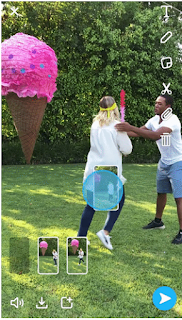
The main aim here is that instead of one All the 60 seconds long video snap are then clubbed in a chronological order. It allows Snapchatters to remove the 10 seconds snap they don’t want to include in the final video.


With an aim to remove restrictions on Snap duration, Snapchat rolled out Multi-Snap feature first on iOS devices, now it has finally come to Android. This new feature allows users to post up to six 10 second clips at a time, which makes up to a total of 60 seconds of snap.
The feature works when Snapchatters holds the record button for more than 10 seconds. After every 10 seconds, a thumbnail for a 10-second clip will appear above the recording button. It will keep on recording and make 10-second videos which will be shown at the bottom until a maximum of 6 is reached.

The main aim here is that instead of one All the 60 seconds long video snap are then clubbed in a chronological order. It allows Snapchatters to remove the 10 seconds snap they don’t want to include in the final video.

How to use Snapchat's Multi-Snap and send more than 60 seconds Snap
Update Your App: First things first, in order to use the new Multi Snap feature, you will need to update your Snapchat app to the latest version. Just open your Google Play Store and and then go to My Apps and Games. Under your Apps, go to your Apps list and look for Updates. Just tap on the Update to update your snapchat app to the latest version.
Creating Snapchat Multi Snaps
Here's a step by step guide on how to create Multi Snaps on Snapchat.
1. Let's assumed that you have updated your Snapchat app to the latest version. Once updated, open your Snapchat app.
2. On your screen or Camera screen, as you normally do press and hold the Camera Capture button to record a video snap.

3. Just keep holding the Capture Button even after the timer runs out. wait for it, will automatically start recording another Snap again. This will keep repeating.
4. When you are done, your 60 seconds Snaps will appear on the bottom of your screen. Now you can edit the Snaps, keep the ones you want, and remove the ones you don't want by dragging into the trash icon.
5. You can make final editing like you normally do, you can effects and applied to every Snap at the same time.
6. Send or share with your friends. Done. That's it.
Here's a video clip of multi snap.

Things to know about Snapchat Multi Snap feature.
If you don't know where to find or access Multi Snap feature, just go to your Memories under the ‘Snaps’ and ‘All’ tabs.
Please note that, you cannot separate a single Snap from a Multi Snap.
If you save a Multi Snap to your Camera Roll, it will save as a single seamless video.
If you have problems sending a Multi Snap to My Story, you can always find your Snaps on your Stories screen and try resending each one individually.
Also, Multi Snaps cannot be looped, reversed, or include 3D stickers.
That's it on Snapchat Multi Snap feature. Hope this guide help you send more than 60 seconds snaps or multi snap on Snapchat.
You May Also Like:
How to Use Snapchat Stickers including 3D Stickers
What is a Snapstreak on Snapchat? And What does the number next to Fire Emoji mean?
Snapchat Birthday Filters ~ How to use Snapchat birthday filters
Snapchat New Trophies - Snapchat Added Eight (8) New Trophies on December 22nd, 2015
What does a Gold Star emoji mean on Snapchat? What Does a baby mean on Snapchat?
What are Snapchat Trophies? What do Snaptchat Trophies mean?
Snapchat Add Nearby - Snapchat Update
How To Remove or Delete friends on Snapchat
How to Create and Send Snaps on Snapchat?
Snapchat Emoji meanings ~ Snapchat Updates
What Do Snapchat Emojis and Numbers Mean?
Snapchat Geofilters - Everthing you need to know
How to Search Snapchat Username, Lookup Snapchat Usernames
What Do Snapchat Emojis and Numbers Mean?
406 comments
comments «Oldest ‹Older 401 – 406 of 406 Newer› Newest»DramaBox Mod APK is an entertainment app designed for viewers who enjoy short dramas, romantic stories, and exciting mini-series. It offers a variety of genres, including romance, thriller, comedy, and family drama, making it easy to find something interesting to watch. Episodes are usually short, allowing users to enjoy their favorite stories during breaks or while traveling. The app features engaging plots, dramatic twists, and convenient mobile viewing. Before downloading any DramaBox APK file, check its source and permissions to protect your device. For a safer experience, consider the official DramaBox app, which provides access to available content through its supported features and subscription options. are drama box movies free
ReplyChoosing the right Srinagar taxi service can improve your overall travel experience by providing flexibility and convenient transportation. From short city rides and airport transfers to full-day sightseeing tours and outstation journeys, taxi services can meet different travel requirements.
Replyhttps://dochub.com/m/shared-document/modcombo/QonjxvZRGxmvAgBK6dl87g/roofing-companies-fort-pierce-florida-for-reliable-roofing-care-pdf?dt=ZZMp_2d3ytSg5MsyYHXb
Replyhttps://www.dropbox.com/scl/fi/78q1fcbpd3dyribrpjj1t/Roofing-Company-Fort-Pierce-for-Dependable-Property-Protection.pdf?rlkey=8cw5ps8eq20lo1ksirvjh7twz&st=f5hyx3pr&dl=0
https://drive.google.com/file/d/1DBI9EeHC4DJCDXRphQcwHJtU6FObH8KZ/view?usp=sharing
https://www.mediafire.com/file/hiuro42oaznqee1/Roofing+Stuart+Services+for+Stronger+and+Better+Protected+Properties.pdf/file
https://studylib.net/d/5qhY2
https://www.filefactory.com/file/86bda147ca89620593735f6c27edea7e
https://www.flipsnack.com/F67CB76F8D6/roofing-companies-stuart-fl-for-reliable-property-protection
https://online.fliphtml5.com/checkwebsitedapa/noqy/
https://disqus.com/by/stuartroofrepair/about/
https://leetcode.com/u/roofingportstluciefl/
Delivering freshness and flavor from farm to kitchen, our food supplier in UAE keeps your business stocked with premium products.
ReplyTrust a food supplier in UAE that combines quality sourcing, fair pricing, and reliable delivery to support your business every day.
XuperUna forma fácil y cómoda de mirar programas de televisión y películas sin tener que pagar nada. Sin tener que alternar entre diferentes aplicaciones, es posible ver caricaturas, series de televisión, deportes en vivo, películas y noticias usando solo una aplicación.
ReplyXuper Es una sofisticada y moderna aplicación de entretenimiento que ofrece la posibilidad de ver películas gratis. En esta aplicación, hay un solo sitio en el que puedes hallar todo el contenido. En vez de emplear distintas aplicaciones para cada tipo de contenido, tienes la posibilidad de acceder a películas, series, dibujos animados, deportes en vivo y noticias desde una sola plataforma.
Reply